CNC 102 - Intro to the Shapeoko 4'x4' CNC Router
About this Workshop
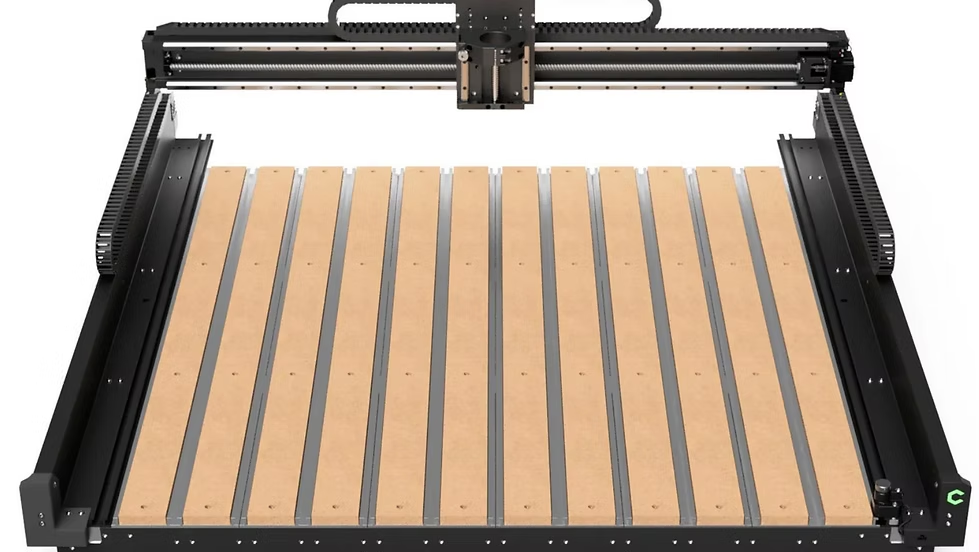
CNC 102: Intro to the 4’ x 4’ Shapeoko CNC
CNC 102 builds on the fundamentals learned in CNC 101 and transitions participants from a desktop CNC to the makerspace’s Shapeoko 4' × 4' CNC router. This workshop focuses on working at a larger scale and understanding more advanced CNC toolpaths and workflows.
Participants will explore how CNC concepts change when moving to a larger machine—covering workholding, efficient job setup, and strategies for cutting larger, more complex parts. The class emphasizes safe operation, thoughtful toolpath planning, and practical techniques used for real-world CNC projects such as furniture parts, signs, kinetic sculptures and more!
Bring a laptop with Carbide Create installed. Download it for free here. Available for both Windows and Macs.
What You’ll Learn
-
Overview of the Shapeoko 4' × 4' CNC and its capabilities
-
Safety procedures and best practices for operating the Shapeoko CNC
-
Various workholding techniques
-
Deeper dive into toolpaths and cutting strategies
-
Tool selection and basic feeds & speeds concepts
-
Efficient setup and job workflow for larger CNC projects
Prerequisites
-
Completion of CNC 101 (Nomad Pro) is required before registering
Who This Workshop Is For
-
Makers ready to move beyond desktop CNC machines
-
Users seeking access to the Shapeoko CNC at the makerspace
After the Workshop
Participants who successfully complete CNC 102 will be eligible to use the Shapeoko CNC at the makerspace, in accordance with makerspace policies and equipment availability.
Requirements
Age Requirements
Participants must be over the age of 14 to attend and over 18 to obtain a makerspace membership.
Meet your Instructors
Vladimir Mariano
Vladimir Mariano is a maker, educator, and community builder with extensive experience in digital fabrication and design. He runs a community makerspace and teaches hands-on workshops focused on tools such as 3D printers, laser cutters, and CNC machines. In addition to in-person instruction, Vladimir creates online courses through Desktop Makes, where he teaches students how to design and build their own projects using Autodesk Fusion and modern fabrication tools. His teaching style emphasizes clear, easy-to-follow workflows, helping makers move from first exposure to confident, creative use of the tools.
Workshop Ended
This workshop has already taken place. Enrollment is closed.